Dub Any Video
in Any Language
From upload to download, DubFlow transcribes, translates, and voices your content with natural neural speech — while keeping your music and sound effects intact.
Try a free dub
Up to 3 minutes · MP4 · one free dub per person
Dub & subtitle your videos in 20+ languages — Spanish, French, Japanese, Korean, Chinese, Hindi, Arabic, and more
DubFlow is an AI video dubbing platform that translates and voices your videos in other languages while preserving the original music. Upload any MP4, review the AI-generated translation, and download a broadcast-ready dubbed version in minutes.
End-to-End
Dubbing Engine
Every project moves through an automated, resumable pipeline. Watch each stage live, and step in only when you want to perfect a line.
Transcribe
Upload a video with subtitles — or none at all. DubFlow detects speech and timing automatically.
Translate
Context-aware translation tuned to fit each time slot, powered by DubFlow's language engine.
Voice & Align
Natural DubFlow neural voices, time-stretched and fitted into the original speech slots.
Mix & Export
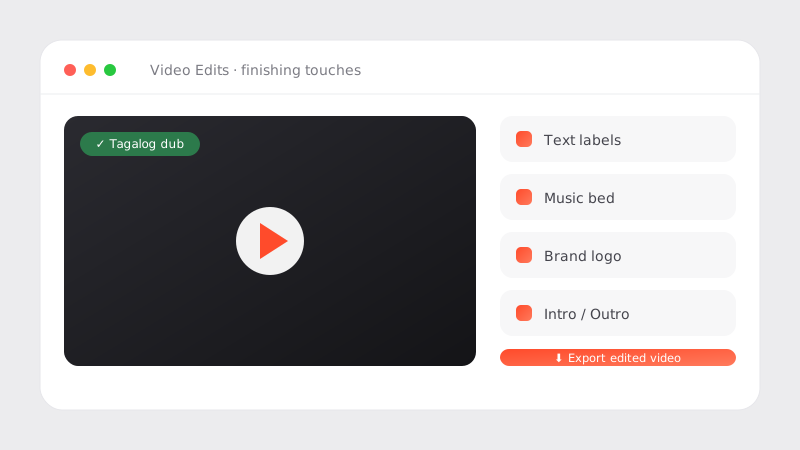
AI stem separation keeps your music and SFX; the new voice is mixed over the original bed and exported as MP4 video, MP3 audio, and SRT subtitles.
All of Dubbing in One Place
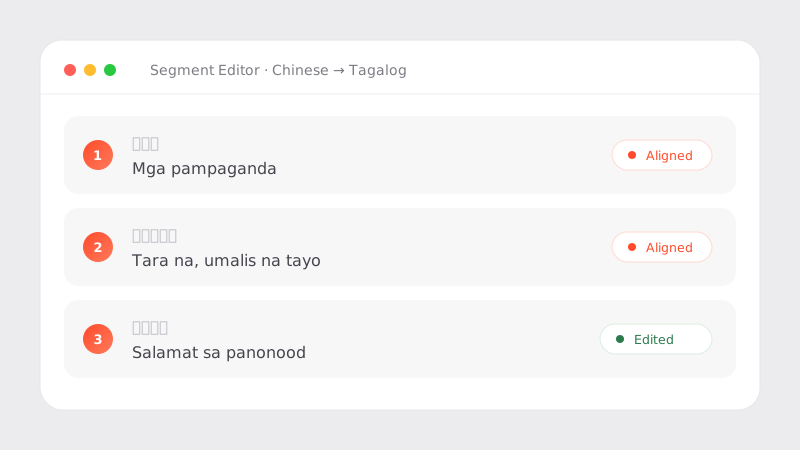
Human-in-the-Loop Review Editor
One-click dubbing is never perfect. Edit any line in any language, switch voices, and regenerate a single segment in seconds — without re-processing the whole video. That's how good becomes great.
Keeps Your Music & SFX
AI stem separation isolates the original vocals and throws only them away. Your background score, ambience, and sound design survive the dub untouched.
Duration-Fit Alignment
Translated lines rarely match the original timing. DubFlow pads, paces, and fits every clip to its slot — and flags the lines that need a human touch.
Live Stage Tracker
No spinners. A real-time tracker shows exactly which stage your project is in, from transcription to final mux.
Private by Design
Your uploads stay in your workspace, processed on our servers and removed on your schedule. Intermediate files auto-clean after delivery.
From Upload to Dubbed in Minutes
1 — Upload
Drop in your MP4 and an optional subtitle file. No SRT? We transcribe it for you.
2 — Review
Skim the auto-translation in the segment editor. Fix a word, swap a voice, regenerate a line.
3 — Download
Get three files per project: dubbed MP4 video, MP3 audio-only, and SRT subtitle file — all in your chosen language.
Plans That Scale With You
Introductory price — regularly $10/mo
- 120 minutes / month
- All DubFlow voices
- Auto-transcription (no SRT needed)
- Music & SFX preservation
- Watermark-free export
- 600 minutes / month
- Priority processing queue
- Team workspace
- API access (coming soon)
What Our Creators Say
"I dubbed a 20-minute lesson into Tagalog over lunch. The editor let me fix the three lines the AI fumbled — my students thought we hired a voice actor."
Maria Santos | EduSkwela, Content Lead
Common Questions
What is DubFlow?
DubFlow is an AI video dubbing platform that translates and voices your videos in other languages while preserving the original background music and sound effects. You upload a video, review the auto-generated translation in the built-in editor, and download a finished MP4 — no studio or technical expertise required.
Which languages does DubFlow support?
DubFlow supports 20+ languages including English, Spanish (Spain), Portuguese (Brazil), French, German, Italian, Japanese, Korean, Chinese (Simplified and Traditional), Hindi, Indonesian, Vietnamese, Thai, Arabic, Turkish, Dutch, Polish, Russian, Ukrainian, Swedish, and Filipino. Any supported source language can be dubbed into any supported target language.
Does DubFlow keep the background music and sound effects?
Yes. DubFlow uses AI stem separation to isolate and remove only the original speech, then re-mixes the new dubbed voice over the preserved music and ambient sound. Your background score and sound design survive the dub untouched.
How much does AI video dubbing cost?
DubFlow offers a free plan (10 minutes per month, watermarked export), a Creator plan at $3/month (introductory price; 120 minutes/month, watermark-free), and a Studio plan at $30/month (600 minutes/month, priority processing). No credit card is required for the free plan.
Do I need subtitle files to use DubFlow?
No. DubFlow can automatically transcribe speech from your video, so you do not need to provide an SRT file. If you already have subtitles, you can upload them to skip transcription and save processing time.
Can I edit the translation before the voice is generated?
Yes. DubFlow includes a segment-level review editor where you can read, correct, or rewrite any translated line before audio is generated. You can also regenerate individual segments after the initial dub without re-processing the whole video.
How long does dubbing a video take?
Most projects complete within a few minutes depending on video length and server load. A live stage tracker shows exactly where your project is at every moment — from Transcribe and Translate through Voice and Mix.